I have heard a lot of people talk about Agile development methodology. The read agile manifesto and then they continue to do "waterfally" things. While this is a fairly interesting topic to discuss, I want to draw your attention towards people who created and signed this manifesto. I consider them the most influential people in the industry. It will be a very good idea to look at what they have to say about software. Let's pick one name "Robert C. Martin", popularly known as Uncle Bob.
Uncle Bob has authored and co-authored several books. He also has got an entire series of books under "Robert C Martin Series". I want to talk about a book that he has authored with title "Clean Code".
If there is just one book that you need to read then I would say that this is the book you need to read. At times people read books and then continue to produce shit, this is not such book. This will completely change the way you write your code. Although the examples are in Java, everything Uncle Bob says is mostly applicable to C#, Python, PHP etc. So, regardless of the technology you write your code in, do read this book. Don't be fooled by name of chapters in this book might sound simplistic to you (because there are entire chapters just of naming things, creating functions etc). This book has got potential to change the way you write your code forever. There is a lot of code in this book you have to take out time to read thru all of those and once you are done with the book; you will be a better developer.
What I just said might sound like a too big of promise to you. Just believe me, and buy this book.
Flowers and dagger. They don'td belong together. They are not related. Thinking of flowers; beauty, gentleness, peace and good appearance comes into mind. Opposite of flowers is dagger.
Now you must be thinking why am I describing dagger and flowers to you. The reason is to set background for question that rose in my mind during one of my closest family member's wedding; and my answer to it. As per the tradition, groom had to carry a dagger and a bunch of flowers in his hands all the time before wedding ceremony. Considering the fact that this custom was created by very thoughtful ancestors, I began to think of the reason behind coming up with this.
While looking at both together I was looking at the things around and realised that this was in indicator telling groom to prepare himself with a mindset that is both like flower and dagger. In the next phase of life he will have to use both flowers and dagger. At times he will have to be as gentle as flower and at times he will have to be as hard and threatening as dagger. Using flowers where dagger is needed would yeild wrong results and using dagger when flowers are needed would yeild wrong result.
Be mindful and always carry a dagger and a bunch of flowers.
/* 2520 is the smallest number that can be divided by each of the numbers from 1 to 10 without any remainder. What is the smallest positive number that is evenly divisible by all of the numbers from 1 to 20? */class Program
{staticvoid Main(string[] args){bool divisible =false;int number =1;while(divisible ==false){
divisible =true;for(int i =1; i<=20; i++){if((number%i)!=0){
divisible =false;break;}}if(divisible==true){
Console.WriteLine(number);break;}else{
number++;}}}}
At many places we see variable named "i","j","c" etc scattered every where around the code; in all the methods. The obvious question that rises is "is such short variable name (e.g., i,j,k,c,k etc) fine?". Many people says that the variable name should ALWAYS be long and descriptive but you sense of "code smell" says that it is fine. But some people says that it is fine. This might actually confuse you.
Here is the rule to answer answer the above question:
Uncle Bob's Rule: For variable: Longer the scope, the longer the name should be.
For function/methods and classes:
Longer the scope, shorter the name should be.
Lets understand it with an example of variable name:
The code below with variable named "i" is fine because the scope of "i" is very short :
private static int getSumOfCharsInString(String name){int sum = 0;for (int i = 0; i < name.length(); i++){sum += getIntValueForChar(name.charAt(i));}return sum;}
But here the following code with variable named "c" is NOT FINE because the scope of the variable named "c" is very long(Its up to you to decide how much length to be considered as "long"). The variable named "c" should be refactored to something meaningful and long.
int main()
{
    char c;
    void getfile();
    void getfname(char []);
    char temp[MAX];
    getfile();
    getfname(temp);
    if ( source != '\0' && html != '\0' )
    {
        fprintf( html, "%s", "" );
        fclose( html );
        fclose( source );
        printf("\nThe file is now created");
    }
.
.
.
    do
    {
       c = getc( source );
       if ( c == EOF )
       {
          break;
       }
       else if ( c == '<' )
       {
          fprintf( html, "%s", "<" );
       }
       else if ( c == '>' )
      {
          fprintf( html, "%s", ">" );
      }
      else if ( c == '&' )
      {
         fprintf( html, "%s", "&" );
      }
      else
      {
         fprintf( html, "%c", c );
      }
  }
  while ( c != EOF );
.
.
}
You just can't start using the IDE thinking that "yahh... !! I know how to type", "I know how to run"; but that is not enough. You need to consciously learn your IDE.
The modern IDE is very powerful. They charge you such high amount of money because of the facility they provide. It has a lot of power which can save you a lot of time.
It's worth spending some days learning the shortcuts of your favorite IDE. Whether it is ItelliJ Idea or Visual Studio; do spend time learning it.
If you are learning Clojure from books and if you feel that they are not a good place to start with then here is a resource that might help you in getting started and give you over all idea.
The nth term of the sequence of triangle numbers is given by, tn = ½n(n+1); so the first ten triangle numbers are:
1, 3, 6, 10, 15, 21, 28, 36, 45, 55, ...
By converting each letter in a word to a number corresponding to its alphabetical position and adding these values we form a word value. For example, the word value for SKY is 19 + 11 + 25 = 55 = t10. If the word value is a triangle number then we shall call the word a triangle word.
Using words.txt (right click and 'Save Link/Target As...'), a 16K text file containing nearly two-thousand common English words, how many are triangle words?
private static long calcuateTriangleNumber(int no) { return no * (no + 1) / 2; }
public static long getTriangleNumber(int no) { long triangleNumber = 0; if (no >= countedTill) { int i = 0; for (i = countedTill; i <= no; i++) { triangleNumber = calcuateTriangleNumber(no); triangleValues.put(no, triangleNumber); } countedTill = i; } else { triangleNumber = triangleValues.get(no); } return triangleNumber; }
private static boolean isTriangleNumber(long no) { boolean isTriangleNumber = false; long triangleNumber = 0; int i = 0; do { triangleNumber = getTriangleNumber(i); if (triangleNumber == no) { isTriangleNumber = true; break; } i++; } while (no >= triangleNumber); return isTriangleNumber; }
private static String getFileContent() { StringBuilder content = new StringBuilder("");
File aFile = new File("D:/words.txt"); Scanner aScanner = null; try { aScanner = new Scanner(aFile); } catch (FileNotFoundException ex) { System.out.println("File could not be readed"); ex.printStackTrace(); System.exit(0); } while (aScanner.hasNextLine()) { content = content.append(aScanner.nextLine()); } return content.toString(); }
private static LinkedList<String> getWordList() { LinkedList<String> result = new LinkedList<>();
String content = getFileContent(); StringTokenizer lineTokenizer = new StringTokenizer(content, ",\""); while (lineTokenizer.hasMoreTokens()) { result.add(lineTokenizer.nextToken()); } return result; }
Here is a post that explain the solution to the problem I had faced a little while ago.
I was working on a PHP project. Git was my version control system. And FTP was the primary protocol for uploading the PHP files from development server(on local machine) to the deployment server(remote machine).
I felt that uploading the files manually to the server was tedious task (although I could find out what files have changed between given commits etc). This uploading was taking quite a lot of time of ours so I thought of getting some automated solution to this problem. I "googled" a little about it and here is the solution:
We were already using the Git. We used a ready made - open source solution developed by other developer.
The tool that made our life easier was git-ftp. It is hosted on https://github.com/ezyang/git-ftp. You can freely obtain it and use it for your purpose. In our case we used it for uploading PHP files but it might work for other suitable tasks also.
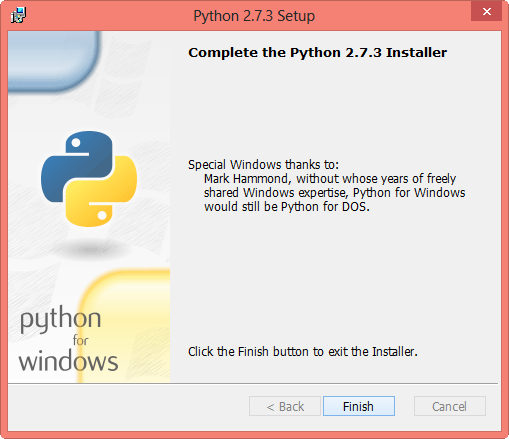
Here is are the steps to install "git-ftp" on windows machine: Step 1: Install Python Obtain Python 2.7.3 from the official Python website. Start the installer. It should have screens as shown below.
Step 2: Put python executable in path
After the last screen appears click on finish button. No you will have Python installed on your machine.
But executing it from the console would give you an error because it is not in path. In order to put python executable in your path you need to do it as shown in the images below:
Copy the path where python is installed.
Right click on My Computer and then click on properties.
Then click on Advanced System Settings.
Then click on "environment variables" button.
Then search for "Path" in "System Variables" and append the ";" and the path in which Python is installed.
Then click on ok ok ok ...
By now you will have python set and you will be able to execute it from command line.
Step 3 : Install Setup Tools
Installation of setup tools is required. Set up tool's windows installer can be obtained from https://pypi.python.org/pypi/setuptools .
Install it as shown in the screenshots.
By now you will have set up tools installed.
Step 4: Install GitPython
You need to install GitPython then. It is required because the Python script will be accessing the git repository. GitPython can be obtained from http://gitorious.org/git-python.
you need to install it from command line by invoking the setup.py with install parameter.
eg:
Now we have got GitPython installed we can move on to our project directory.
Step 1 to step 4 will be one time only. Step 5 to will be repetitive for project. Step 5: obtain and put the python script in your project directory.
We can obtain the python script from https://github.com/ezyang/git-ftp.
Put the git-ftp.pyscript in the project directory.
Step 6: Create a file containing FTP credentials.
We need to create a file containing the credentials in the .git directory. If you don't create the file then it will ask you for details every time the script runs. If we put the file with credentials in .git directory then the python script will automatically read the details and upload that to the server.
The name of file must be "ftpdata" (without quotes). File name should be "ftpdata" without any extensions like txt etc.
If you are having multiple branches and each branch is deployed to different server the file might look like(name in square bracket is name of branch):
Put this file in ".git" directory.
Step 7: After doing this upload the "git-rev.txt" file to the root directory of the server. Put the sha1 of the last commit in the file.
The upload script knows which files needs to uploaded from this file. This file is changed by the upload script each time it executes.
Now you can execute the git-ftp.py scrip. It will upload all the files that are committed in git to appropriate server (depending on your branch).
Some users might also want to create a ".bat" file that looks like:
Some users might also want to create a ".bat" file with "git gc" command (make sure that git is in your path to do this).
Now you have everything set up. Just run the script and everything works !! :D
Every time you make the commit, you can just run the script and all the files committed will be uploaded to the server. No overwrites by mistake!
Suggestions: 1. If upload does not work then execute "git gc" command on your project repository. 2. If upload fails then make sure that you and all others are in sync with each other through git. 3. Read the error message from script if something goes wrong. 4. The installation is easier on linux machines. 5. See the read-me of project at https://github.com/ezyang/git-ftp.
Limitation:
Some other protocols are not supported by the tool which we are using.
Lets not talk about debugging first and talk about 2 other things:
1:
Have you imagined what might be happening when an engineer decides to create a new plane with a new design ? (We assume that one can do so ;) ) He thinks about the purpose, safety, design etc. He might think about aerodynamics, propulsion, fuselage, mass, structure etc. The design process would also include the use of Computational Fluid Dynamics (CFD). In short the process before building some physical component takes a long time. Even after they have built some physical model, they need to test it in wind tunnel to be sure about it. Similar amount of effort is given the construction/engineering of other components.
If you want to test your physical component in real, then you might have to rent/buy a wind tunnel at relatively higher price then of an average computer. Also if some other electronic/mechanical component fails at run-time, finding the actual problem and fixing it is a difficult task.
2:
Imagine you have a Mercedes-Benz W116. The car was excellent product when it was built and you are not maintaining it properly. It continues to cause problem frequently because you are not maintaining it properly. You have also learned to fix the problems with car as and when they arise.It might take some time some day, but you some how fix it.
On one fine day your mom asks you to drop her to a church and in-between on the road the car causes problem. But, as you have become familiar with problem solving you would be able to solve it and car start again and you would be able to successfully drop your mom to church. In this situation your mom should not be happy thinking that "owww, my son could correct that!"; instead she should think like "oh! how could this happen ? car stopped ?!! ".
Now that we have laid out enough foundations that needs clear out the point that i want to show; we can discuss the main topic of this post. That is "Debugging".
We, the software craftsman/developers write software/applications that people use in day to day life. But we are not able to develop them on the first run. Sometimes things would go wrong with the software that we are developing. And when things go wrong; the bug comes out, we must find the cause and fix it.
To fix the problem we must look "into" the software while it is running. Now compare it with the aircraft system. Imagine what hey might be doing when an issue rises with the engine of aircraft ?
Surely the software craftsmen/developers have more power when compared with aeronautics people. They can not see what is happening in the engine while it is running at 10,000 RPMs while the software developers can pause the execution of software on their machines without any significant amount of investment. Developers do not have to got to wind tunnels in order to see something in action.
A software developer/craftsman can put a break-point and then do the magical things like step in, step out, runt to cursor etc. Recently I have met some some people for whom the debugger does not exists. They do not know about the remote debugger available. They do not know how to configure xDebug with PHP. They do not know that GDB exists. Some people think that they are using exotic languages like Ruby and Python and debugger is not there for their language. But; by thinking wrong directions they are missing something really important.
Sometimes people forget that debuggers exists and we can see what is happening in your code in real time line by line, variable by variable. We can see all the variables, objects etc by putting a watch on them !! If we are doing web development then we can see all the parameters in the variables in the real-time inside our IDE(although non visual-command based debuggers exists, but i prefer debugging visually)(eg we can see $_GET, $_POST etc in php while debugging in Netbeans).
We can see what is happening in our software step by step, line by line; Now imagine what people in aeronautics and other industries would had done if they had such power at their fingertips at such low cost ? We are underestimating the power that we have with debugger and in-turn underestimating ourselves.
But make sure that it does not become a daily and routine activity. Debugging is not central activity of development process. It should not be daily activity as it was with our virtual/imaginary car.
Your boss should also think same as your mom. Debugging should not become routine as it was with car. Neither some one should be proud of it!
Also the boss should not be proud of a person with good debugging skills!
We should work in such way that odd situations like these do not rise!
Write such code that no problems get raised and in-turn you do not have to debug. But when the problem gets raised be equipped with debugger of your language and solve the bug well. Do not forget to take advantage of good debugging tool, but make sure that you are not making it continuous activity.
When discussing layering, there's often some confusion over the terms layer and tier. Often the two are used as synonyms, but most people see tier as implementing a physical layer.
- "Patterns of enterprise application architecture" By Martin Fowler. Page No: 19. ISBN: 978-81-317-9402-9
While discussing with a collage mate I found out that the confusion about the "tiered" architecture of the application and the "layered" architecture of the application really needs to be cleared up. So this post is here to make the things clearer. Those already know what the difference is can ignore this post; this post is intended for those who do not understand it well. (However this will not teach you how you should design your layers/tiers; instead it shows the difference)
But before going into the question of layer and tier we need to ask a fundamental question: why tier and layer are required ?
And the answer could be to reduce complexity, increase re-usability, or for standardization etc.
In both the terminologies, they divide the code in different parts like "presentation","domain logic","data source logic"(or even more parts sometimes).
In really simple application one might have one method(i use the term method to indicate a group of callable statement, it might be a function, subroutine etc in context of any other c like language). One might be to get data, second could be for domain logic and third could be for view. But as the application becomes more and more complex you will be required to separate them through some mechanism. In the next iteration of development you might move those methods to different classes. And if the application is even more complex, you might put those classes in different package,or namespace or any other mechanism to separate them.
If it is a java application you might create separate classes, put them in one jar and use them in the upper level abstractions. If you are working on a .Net project you might create a dll in same way. If you are working in some other language there would be some mechanism to achieve the same thing.
Typically one would create a package(or dll or jar) for data source logic (that is for accessing data from the data source - typically it would abstract the data access to higher level layers. the higher level layers should not know from where the data is coming from. you might be able to change the data source from file to relational database and from that to non-relational database without higher level knowing about the change. You get such advantages when designing an application with layering in mind.). You would use the data source logic in the domain logic. And then further use the domain logic in the presentation. What you would be doing is much like shown in the Fig-1 below:
Fig-1
What we are doing here in Fig-1 is logical separation of code. Although you would have programmed the code in different method, different class, different package, different project; at its heart all the code would be running on the same machine. When the code is running on the same machine as shown in the above fig it is known as "layering".
But sometimes because of some issues the layering of the application does not help, you need to make pieces of you application and put them on different machines to solve those issues. When you put those pieces (e.g., presentation, data source logic and domain logic etc or even more pieces) on different machines, they would communicate with each other over the network in order to complete some activity.
The communication could happen by simply accessing a restful URL, or calling a web-service or calling a WCF service of RMI or any other technology. Typically when you say the architecture is "tiered", the 'pieces' would typically be on different physical(or logical) machine.
Fig - 2
Whenever we use the term tiered the communication between pieces happens through network. While development you might put all the pieces on a single machine, but typically the term tiered means that they can be deployed ever the machine anywhere.
When ever you apply tired architecture, it greatly affects the over all performance when compared with the layered architecture because the communication between two physical machines is always slower than the communication between two pieces on the same machine.
Although one tier itself can have many layers in it.
To conclude we can say that even if you have used methods to separate view, domain model etc; you can call it a layered architecture. Layered architecture is on same machine. Tiered architecture is always on different machine (although you can put them on same machine if you wish).
There are many points that affect the decision abut layered architecture and tiered architecture so a trainee or journey man should never take decision directly. He/She should always consult the "master craftsman" before taking any decision.
It can be verified that the sum of the numbers on the diagonals is 101.
What is the sum of the numbers on the diagonals in a 1001 by 1001 spiral formed in the same way?
*/
/**
* this is what one can write with poor tools
*/
/**
* Timing: 1:01 am to 1:54 am
* @author umang
*/ public class Problem28 {
/**
* @param args the command line arguments
*/ public static void main(String[] args) { int max = 1001; int arr[][] = new int[max][max]; int x = max / 2; int y = max / 2; int count = 0; int increment = 2;